The full tour
Everything between winning the job and getting paid for it.
SubMark covers the whole subcontractor workflow — bid, schedule, document, cost, bill — in one system your office and your field crews share. Here’s what’s inside, module by module.
WIN THE WORK
From first call to signed contract.
Track every opportunity from lead to award, do your takeoff on the actual drawings, and turn it into an estimate and a GC-ready proposal — without retyping numbers between tools.
Deals Pipeline
Kanban board from lead to close — drag deals between stages, convert to a project on award.
Bid Board
Every bid with its GC, proposal amount, and status — Lead, Estimating, Submitted, Awarded, Lost, or No Bid with the reason recorded.
Invite to Bid
Send bid packets to your subs and suppliers by link — no login for them. Their questions and quotes come back in one place, side by side.
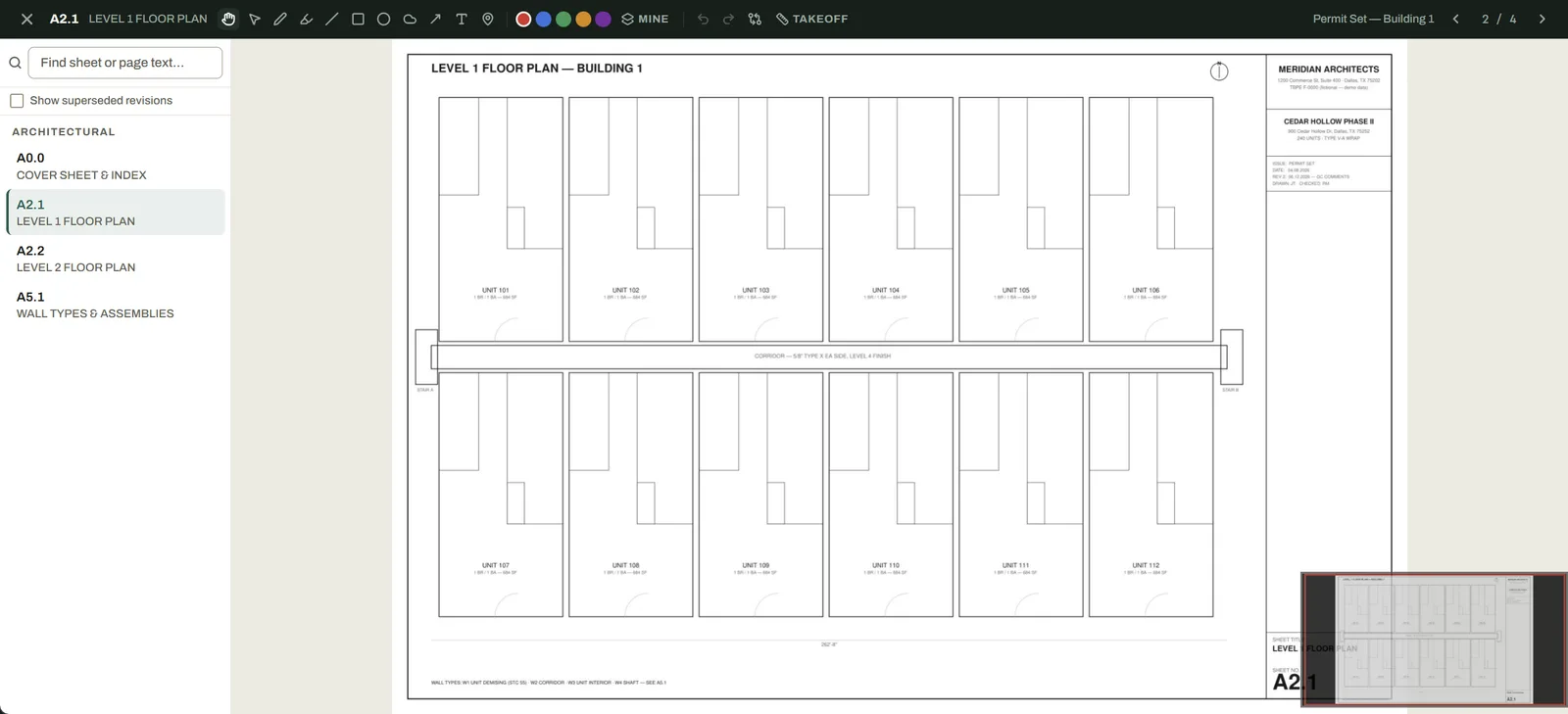
Plans & Drawings
Upload full drawing sets and AI reads every title block — sheet numbers and names filled in automatically. Deep-zoom viewer with markups and pins that stay on the sheet.
Takeoff
Measure and count directly on plan sheets — named conditions with waste factors roll up to quantities that flow into your estimate.
Estimating & Proposals
Line-item estimates with reusable templates and O&P controls, exported as a clean GC-facing proposal PDF.
Sub Contracts
Per-job work authorizations and master agreements for the subs you hire — auto-filled from the project, emailed as a PDF, tracked through signing.
RUN THE FIELD
Know who’s where, what got done, and what changed.
One calendar across every job, daily documentation your GC will actually accept, and a paper trail for every scope change the moment it happens — not three weeks later from memory.
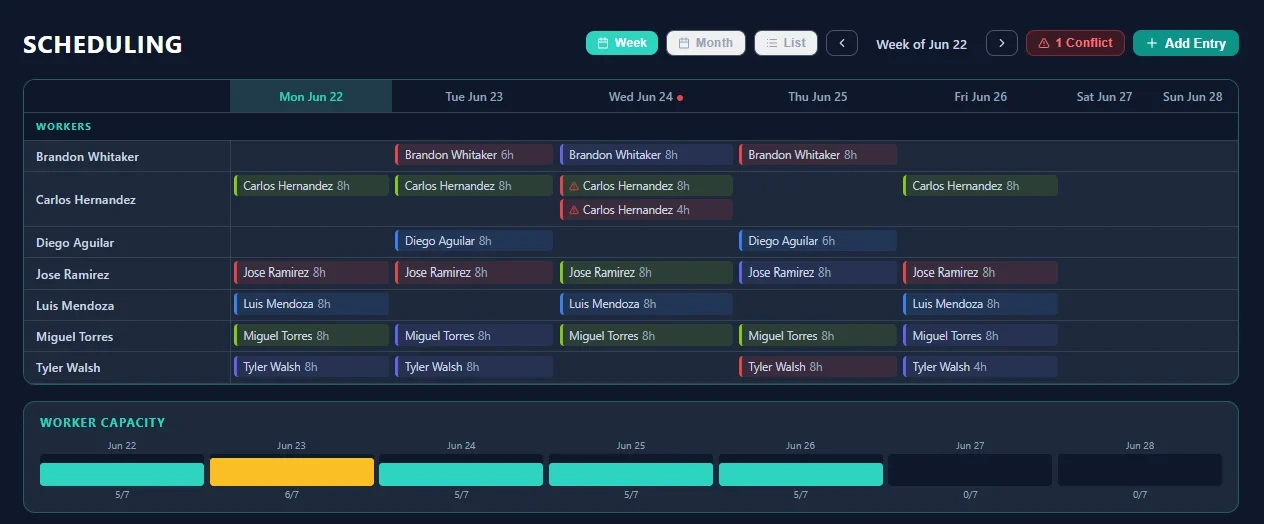
Crew Scheduling
Cross-project calendar with automatic double-booking conflict detection.
Time Clock & Labor Logs
Clock in/out or log hours per worker, per job, per day — rolls straight into costs and payroll.
Daily Logs
Weather, narrative, labor, materials, and photos with a submit/review workflow.
Where Workers Are
A live view of which workers are on which jobs today, down to the work area.
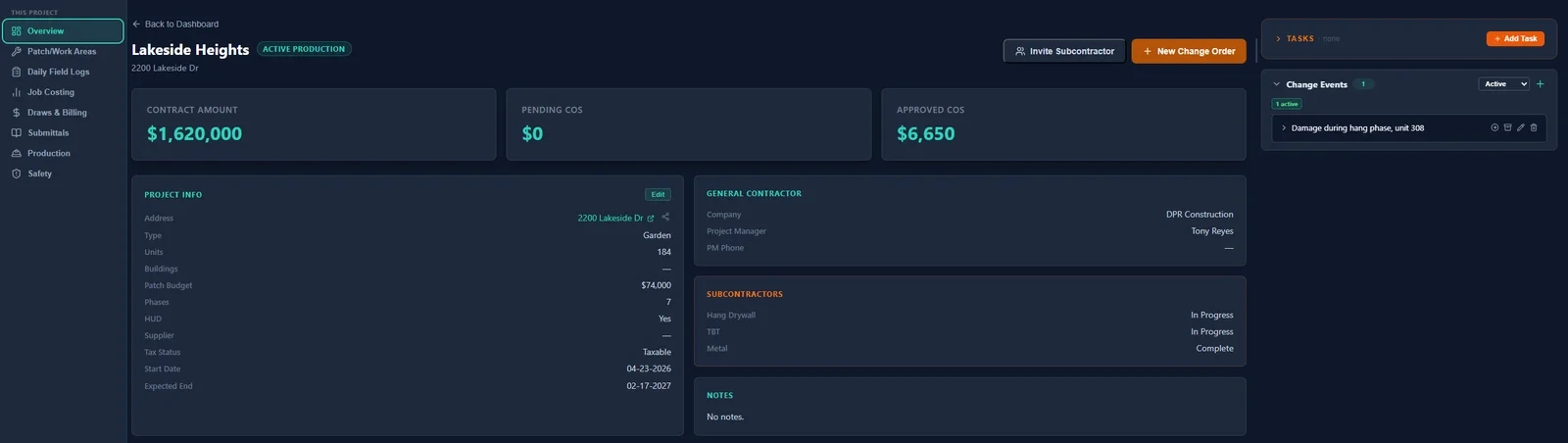
Change Events
Field crews log scope changes with photos and responsible trades the day they happen. Convert to a formal CO in one click.
T&M Tags
Field tickets priced off your rate lists and signed by the GC on the spot, then bundled into one change order.
Punchout / Patch Tracking
Punch work tracked as its own phase with its own budget, progress, and extra-work spotlight.
Production Dashboard
Hanging, taping, and texture sequencing per job, plus a site profile with hours, parking, and POCs.
PROTECT THE MARGIN
See the overrun while you can still do something about it.
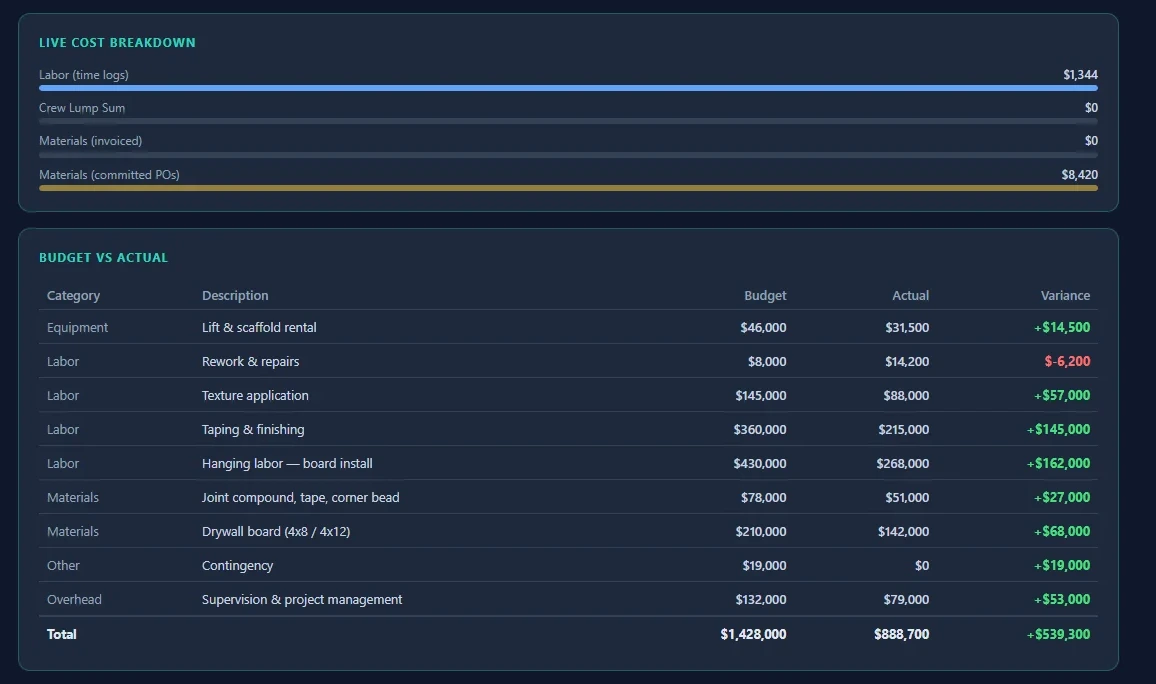
Labor actuals, materials, POs, and subcontractor costs tracked live against budget. The jobs quietly bleeding money show up on a dashboard — not in an end-of-job autopsy.
Job Costing
Live budget vs. actual across labor, materials, and subs, per job and per phase.
Purchase Orders
POs with line items, supplier management, and invoice reconciliation.
Invoices Inbox
Supplier and sub invoices land in SubMark instead of an inbox — AI reads the vendor, number, and amount, then you tag each one to its job and PO.
QuickBooks Online
Rolling out now — bills and purchases pull from QuickBooks into job costing, invoices and POs push back the other way, and a per-job meter shows how much of each job’s cost your books account for.
Labor Reports
Filter, group, and export labor spend any way your accountant asks for it.
Report Builder
Build custom reports on any data in SubMark — pick columns, filter, group, export.
Change Order Tracking
Build the COR, send the GC a link to review it, and take their redlines and decision in place. Every CO’s status, aging, and recovery tracked against the contract value.
AI Change Order Assistant
Draft the description and justification from the evidence already in the project — then review every field and apply only what you want.
GET PAID
AIA pay apps without the Sunday-night spreadsheet session.
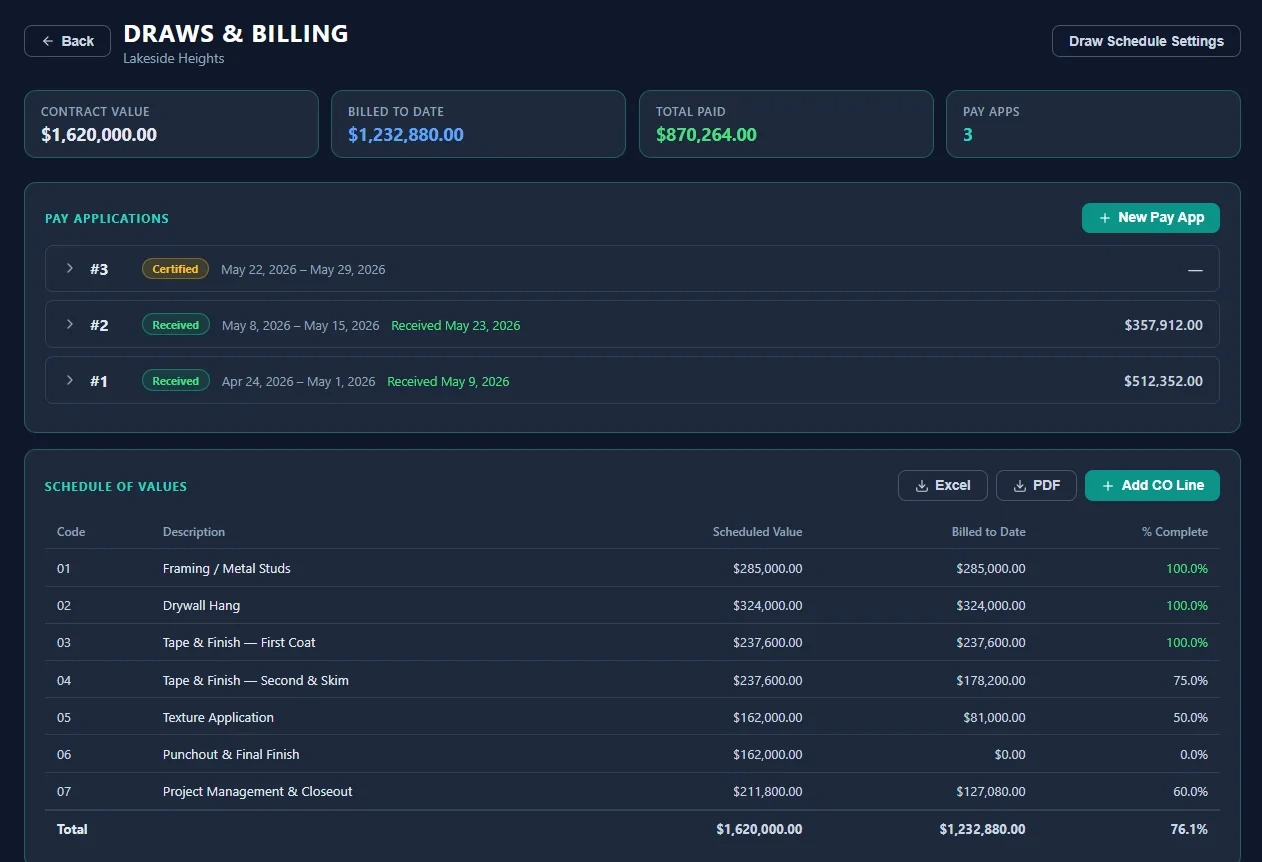
Build the schedule of values once, lock it at execution, and let approved change orders sync into every draw automatically. Export a G702/G703-style package your GC’s AP department accepts the first time.
AIA-Format Invoicing
Pay applications with schedule of values, retainage, and progress billing.
Draw Calendar
Every GC’s draw deadline and submission method in one calendar, with reminders.
Lien Waivers
All four standard waiver types generated and tracked through signing.
Submittals
Submittal packages with a material library, cover sheets, and merged PDF export.
Timesheets & Payroll Report
Weekly rollups with worker signatures and supervisor approval, plus a payroll summary export.
Monthly Status Updates
The monthly progress email to your GC, drafted from live patch and change-order numbers, with a link to your open COR log. Edit it, then paste it into your mail.
SAFETY & BACK OFFICE
The compliance and office work, handled in the same place.
A real safety program — not a binder — plus the CRM and worker records that keep the office out of six different spreadsheets.
Safety Program
Toolbox talks, inspections, incidents, violation strikes, recognitions, and certification/COI tracking.
Workers
Your full field roster with rates, pay types, documents, status, and assignment history — grouped into the crews you actually schedule.
Companies & Contacts
CRM for GCs, suppliers, and subs — every contact tied to its jobs and bids.
Ask SubMark
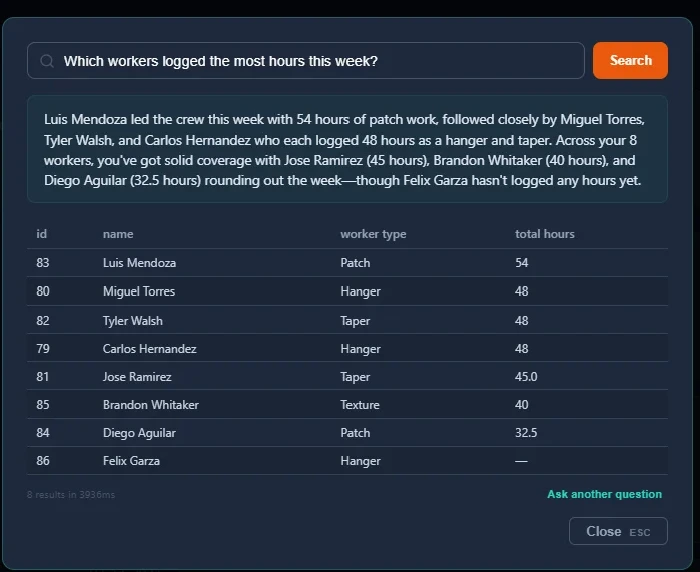
Ask questions in plain English — “which jobs are over labor budget?” — and get answers from your live data.
Subcontractor Management
A directory of the subs you hire — COI, W-9, and prequal status, plus their jobs, documents, and the job-award emails you send them.
Subcontractor Collaboration
Invite your own subs into a project with scoped access — they log their work, you keep control of what they see.
On the roadmap
Coming next — shaped by early customers.
These aren’t in the product yet. Founding customers get a direct say in what we build first.
Email Integration
Connect Outlook or Gmail with AI-powered routing to projects.
Mobile App
Native field app with offline support (the web app already works on phones today).
Executive Dashboards
Company-wide financial summaries and project health indicators.
See it on your kind of jobs.
A 30-minute walkthrough with the person who built it — using workflows from your trade, not a canned demo script.